
AI Song Maker: Soniva Music
Gotech Dijital Hizmetler Anonim SirketiMusic & Audio
4.85.24K Reviews
- Version
- 1.5.20
- Installs
- 1.00M
- Age Rating
- Teen
Screenshots
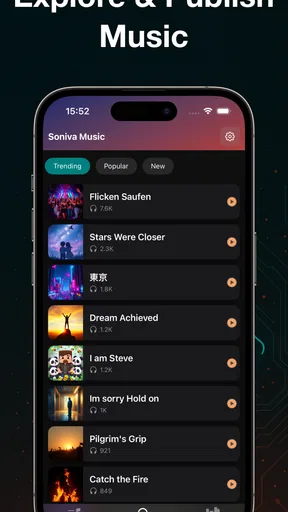
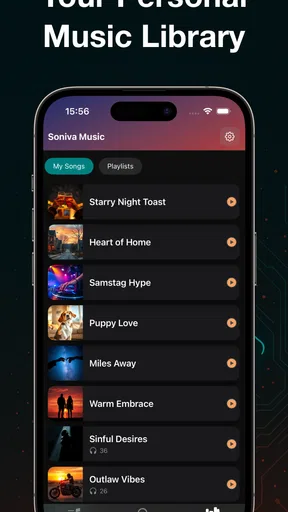
Our Review of AI Song Maker: Soniva Music
 Analysis by Appyee
I often get an idea for a song at inconvenient moments: a phrase on the way home, a tune while making dinner, or a mood that seems to call for its own soundtrack. That is the sort of starting point where AI Song Maker: Soniva Music may help. It is a music-making app from Gotech Dijital Hizmetler Anonim Sirketi, aimed at turning prompts and creative choices into a starting track. I see its best role as a low-pressure place to explore an idea, rather than a replacement for learning an instrument or producing a finished release.
Finding your way around the creative process
Getting started with AI Song Maker: Soniva Music is presented as a straightforward process, which matters when you want to capture an idea before it disappears. The app is free to install, with in-app purchases ranging from $0.99 to $79.99 per item. It is rated Teen, and its current version is 1.3.12, with Android 9 as the minimum operating system requirement.
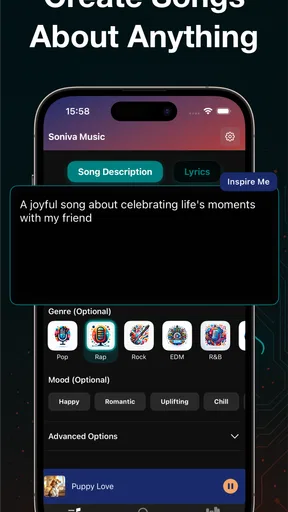
At its most approachable, the app lets you begin with a musical direction rather than demanding that you already know how to arrange a song. That can make the first step less intimidating for someone who has never opened a digital audio workstation. I would still approach each generated result as a draft: listen for what works, decide what feels off, and make deliberate changes instead of expecting a prompt to deliver a polished personal statement on its own.
Navigation and readability are especially important in a creative tool because users may be switching between listening, typing lyrics, and adjusting a musical idea. A simple workflow can reduce the mental load, but clarity is more than a tidy screen: controls need to make it obvious what will happen next. If you are new to song creation, it helps to work on one decision at a time—first the mood or genre, then the words, then any changes you want to make to the result.
Making a song when you are not a musician
The app sits in the music and audio category and focuses on AI-assisted song creation. Its central appeal is that you can bring your own direction, including custom lyrics, instead of beginning with a blank page and a full set of production skills. That makes it useful for playful experiments, rough song concepts, or a personal track built around a line you want to hear sung.
A practical way to get more from the process is to write a short, specific lyric before you start. A couple of clear images or a memorable refrain give you something concrete to judge against the generated music. If the result feels generic, change the words or narrow the musical idea rather than repeatedly asking for a broad “catchy song.” The useful skill here is not finding a magic prompt; it is learning which small change brings the output closer to what you had in mind.
For example, imagine you are preparing a lighthearted birthday message for a friend but do not play an instrument. You could shape a few lines around a shared memory, try a musical direction that suits the occasion, and use the generated track as a private surprise or a rough idea to share. That is a more realistic strength than expecting the app to produce a radio-ready song in one tap: it gives a personal thought a musical form without requiring you to record every part yourself.
Accessibility in everyday use
AI-assisted creation can lower some barriers for people who find traditional instruments or production software difficult to approach. Typing a lyric or describing a sound may be more comfortable than playing keys, and a phone makes it possible to experiment in short sessions. But that does not automatically make the whole process accessible to every user. Someone who relies on a particular screen reader, needs large text, or has difficulty with small touch targets should check how the app behaves on their own device before investing time in a substantial project.
Motor and sensory needs also shape whether a music app feels usable. A touch-first workflow can be convenient, yet repeated fine adjustments may be tiring for someone with limited dexterity. Listening closely to generated tracks can be an enjoyable part of the experience, though noisy surroundings, hearing differences, or sensory sensitivity may change how well that works. I would keep the first session short and test the parts that matter most to you—writing, starting a generation, listening back, and making a correction—before treating the app as an essential tool.
Situational access is another consideration. A quick lyric idea may fit into a quiet break, while reviewing a song needs a setting where you can listen without disturbing others or missing important details. If you create while travelling or between tasks, save your words elsewhere as well until you understand how your chosen workflow handles them. That small habit protects the idea from being lost if you have to leave the app unexpectedly, without assuming anything about its saving or connection behaviour.
Where it differs from familiar music tools
Compared with a conventional digital audio workstation, Soniva appears aimed at making the leap from an idea to a song concept less demanding. A full production tool is usually the better fit when you want precise control over recording, arrangement, mixing, and detailed editing. A lyric notebook is better if you only need to collect words, while a standard music player is for listening rather than creating. Soniva’s appeal is the middle ground: it gives a non-specialist a way to explore how lyrics and a musical direction might come together.
That convenience comes with a trade-off. AI can offer a quick starting point, but it may not understand the emotional detail behind a lyric or produce the exact phrasing you imagined. If you are a songwriter who already has a melody and arrangement in mind, a more hands-on production app may give you more dependable control. If you simply want a fun way to test an idea, the faster, less technical approach can be a real advantage.
For a more useful first session, I would avoid trying to create an entire album or perfect track at once. Pick one small goal, such as hearing a chorus idea or testing whether a lyric suits a particular mood. Keep an alternate version of the words before changing them, and compare one meaningful adjustment at a time. This makes it easier to tell whether a new result is genuinely closer to your intention or merely different.
What to expect, and what may get in the way
Soniva has a 4.8 average from around 84,000 ratings, and it has passed one million installs. Those figures suggest broad interest, but they do not tell me whether a particular generated song will match your taste. The app is free to start, while optional purchases can add cost; I would check the purchase choices in the app before building a workflow around anything that may require payment.
The main creative limitation is that generated music can sound familiar or broad when the prompt and lyric are broad. That is not unique to AI music tools, but it matters here because a fast result can tempt you to accept the first version. Treat generation as a sketching partner, not an unquestionable composer. If you need exact control over every note, timing choice, or vocal detail, use a tool designed for detailed production instead.
There can also be friction when a creative app is used on an older or less capable device, particularly if the experience involves demanding processing. I would test a short project before relying on it for an event or deadline. And if you are creating in a shared room, remember that an app built around listening and iteration may be less convenient without a quiet moment or a way to listen privately.
Who will enjoy it—and who may prefer another route
I would recommend giving Soniva a try if you are curious about songwriting, have lyrics but no accompaniment, or want to turn a passing idea into something you can hear. It is also a sensible option for someone who feels blocked by the blank project screen in a traditional production app. The lower-pressure format can make experimentation feel approachable, especially when the goal is learning what kind of song an idea might become.
I would be more cautious if your priority is professional-level control, a predictable production workflow, or a finished track that needs to meet a specific brief. Musicians who want to record live performances or fine-tune every part may be better served by a dedicated audio workstation. And if you do not enjoy iterating on generated results, the app’s central approach may feel limiting rather than liberating.
Before choosing it, ask yourself what you want to leave with: a spark, a demo-like idea, or a carefully produced song. Soniva is most persuasive for the first two. It can help you get moving, but the quality and personal character of the result still depend on your choices, your willingness to revise, and how much control you need.
Getting Started with Soniva
Jumping into Soniva is like diving into a pool of creativity. The app greets you with a snazzy interface that’s super user-friendly. You don’t need to be a tech wizard to figure it out, which is a huge plus. The app is available on both Android and iOS, so no matter your device, you’re good to go.
Once you’ve got the app installed, you’re prompted to create an account or you can simply dive in as a guest. The setup process is smooth and quick, so you won’t be stuck in setup land forever. Trust me, you’ll be jamming in no time.
Features That Hit the Right Note
What really sets Soniva apart is its impressive array of features. First off, the AI-powered music generator is pretty wild. You can input a few parameters, and the app churns out a melody that fits your vibe. It’s like having a musical genie at your fingertips.
Besides the AI magic, you can also manually create tracks using the built-in instruments. The sound quality is top-notch, so your tunes won’t sound like they were recorded in a garage. Whether you’re into pop, rock, or even classical, there’s something here for every genre lover.
- AI Melody Creation: Let the AI do the heavy lifting and watch as it crafts unique melodies based on your inputs.
- Instrument Variety: From pianos to synthesizers, the app has a wide range of instruments to choose from.
- Easy Editing: Tweaking your tracks is a breeze with the intuitive editing tools.
Another nifty feature is the collaboration option. You can invite friends or other musicians to join your project. It’s perfect for those who love a good jam session but can’t always meet in person.
Personal Experience
I spent a good chunk of time playing around with Soniva, and let me tell you, it’s addictive. Creating a song from scratch felt really empowering. I started with a simple melody generated by the AI, and before I knew it, I’d layered on drums and a bassline. The app made it feel effortless, which is saying something considering my limited musical background.
The community aspect of the app is also worth mentioning. There’s a built-in forum where you can share your creations and get feedback. It’s like having a support group of fellow music enthusiasts cheering you on. Plus, you can listen to what others have created and get inspired to try something new.
Room for Improvement?
No app is perfect, and Soniva is no exception. While the AI is impressive, it sometimes churns out melodies that are a bit on the generic side. However, with a little tweaking, you can usually get it to a place that feels more unique.
Another small hiccup is the occasional lag when using heavy features on older devices. It’s not a dealbreaker, but something to keep in mind if you’re not on the latest tech.
Final Thoughts
All in all, AI Song Maker: Soniva Music is a fantastic tool for anyone looking to explore their musical side. Whether you’re a total newbie or a seasoned musician, this app provides the tools you need to create something truly special. It’s fun, intuitive, and packed with features that keep you coming back for more.
If you’ve got a melody in your mind and a smartphone in your hand, there’s really no excuse not to give Soniva a try. You might just find it becomes your go-to app for all things music creation.
Verdict
Strengths of AI Song Maker: Soniva Music
- User-friendly interface for quick song creation.
- Wide range of instruments and sound effects.
- AI-generated suggestions enhance creativity.
- Supports export to multiple audio formats.
- No prior musical knowledge required.
Limitations of AI Song Maker: Soniva Music
- Limited customization for advanced users.
- Occasional app crashes during editing.
- Requires internet for full functionality.
- Premium features locked behind paywall.
- Ads can be intrusive in free version.
Similar Picks in This Category
View All
YouTube Music
Google LLC4.4

Samsung Music
Samsung Electronics Co., Ltd.3.8

Spotify: Music and Podcasts
Spotify AB4.3

JioSaavn - Music & Podcasts
Saavn Media Limited4.3

Lark Player:Music Player & MP3
Lark Player Studio - Music, MP3 & Video Player4.6

StarMaker: Sing Karaoke Songs
SKYWORK AI PTE. LTD.4.3
Frequently Asked Questions
What is AI Song Maker: Soniva Music?
AI Song Maker: Soniva Music is an innovative app that allows users to create music using AI technology. Whether you're a seasoned musician or a beginner, the app provides tools to compose melodies, experiment with different genres, and generate beats effortlessly. It's designed to inspire creativity and simplify the music-making process.
Is AI Song Maker: Soniva Music free to use?
AI Song Maker: Soniva Music offers a free version with basic features. However, for more advanced tools and options, a subscription or one-time purchase may be required. Users can explore the free version to determine if the app suits their needs before committing to any payments.
What are the main features of AI Song Maker: Soniva Music?
The app includes features like AI-generated melodies, customizable beats, genre selection, and a user-friendly interface. It also offers tools for editing and sharing your creations. Users can experiment with different instruments and effects, making it a versatile tool for music production.
Can I export and share the music I create on AI Song Maker?
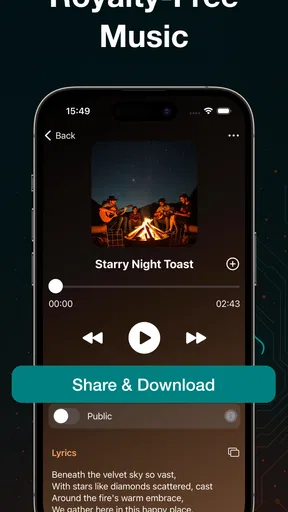
Yes, AI Song Maker: Soniva Music allows users to export their creations in various audio formats. You can share your music directly on social media platforms or collaborate with others by sending your tracks. This functionality makes it easy to showcase your work and receive feedback.
Is AI Song Maker: Soniva Music suitable for beginners?
Absolutely! The app is designed with beginners in mind, offering intuitive controls and tutorials to help users get started. With its AI assistance, even those with no prior musical experience can create impressive tracks. Advanced users will also find plenty of features to explore and refine their skills.
